Thursday, February 28, 2008

It Took 16 Months, But Google Relaunches Jotspot

Google acquired hosted wiki service Jotspot in October 2006. The service immediately stopped taking new users, although existing users were supported. Now, nearly sixteen months later, Jotspot has been relaunched under the Google Apps team, as Google Sites.

Google Sites looks absolutely nothing like Jotspot, other than the fact that both are hosted wikis. All of the structured data templates launched by Jotspot in July 2006 have been stripped out. Users now have a choice between just five basic templates - a standard wiki, a dashboard where google gadgets can be embedded, a blog-like template for announcements, a file cabinet for file uploads, and a page for lists of items. Instead of creating structured templates, users will now simply embed spreadsheets, presentations and word documents from Google Docs, as well as Google Calendars, YouTube Videos and Picasa Albums.

Like Google Docs, Google Sites wikis can be made private, shared with others, or made public. Users can select from a variety of templates, but cannot yet customize the look and feel of the site. Somewhere down the road, Google says, they’ll release an API for the new service as well. Editing is done with a rich text editor that allows for basic formatting.

Google Sites is a free product, with limitations on support and storage (10 GB). Users can upgrade their Google Apps account to a standard edition, also free, and map their own domains to the site. A premier edition is also available for $50/user/year that includes a service level agreement, support and more admin capabilities.

All wiki pages have RSS feeds associated with them to allow users to track any changes.

Existing Jotspot users will continue to be supported on the old platform for the near future, and they will also be given instructions for porting their Jotspot wikis to Google sites.

In an interview today, Google’s Management Director of Enterprise Matthew Glotzbach called the combined products under Google Apps a “Microsoft Sharepoint killer” because it’s allowing businesses to collaborate without all that expensive Microsoft software. It may not be a Sharepoint killer yet, but Google Apps constitutes 2-3% of Google’s total revenues. Some point soon, its going to start hurting Microsoft.

Sample screenshots:


JotSpot image
Website: www.jot.com/
Location: Palo Alto, California, United States
Acquired: On October 31, 2006 by Google

JotSpot provides structured wiki software for small to medium-sized businesses. The company was founded by two co-founders of Excite and was sold to Google in 2006.

JotSpot has been closed to new registrations since its acquisition.

On… Learn More

Google Sites image
Company: Google
Website: sites.google.com
Launch Date: February 27, 2008

Google Sites, launched on February 27th, 2008, is wiki suite targeting small and medium-sized businesses as part of the Google Apps team. Google Sites is the relaunched version of JotSpot, which Google… Learn More

AdSense Click Fraud in India - How The Whole System Works?

invalid adsense clicks india

A recent report on Click Fraud suggests that the maximum number of invalid clicks on Pay Per Click ads originate from India. And this is not the first time - its widely believed there there exists a large “work from home” crowd in India who want to generate “quick cash” by clicking Google AdSense ads.

During a recent trip to Google Hyderabad for BarCamp, I met someone who explained me the whole modus operandi of these secret ad clickers.

work at home google cashPick any issue of Deccan Chronicle newspaper (the English Daily of Hyderabad) and open the Classifieds section - you will see dozens of ads that promise you regular Google AdSense income while working from home. (see this newspaper clipping on the right).

You basically create a website and then write a few articles to get accepted into the official Google AdSense program. Once you become an AdSense publisher, you join any of these “bogus” AdSense network and are introduced to other members who are in the same boat as you.

Now Google would quickly ban your AdSense account if you click Ads on your own website so what these networks do is ask members to click on Ads appearing on websites of other members. So it like a reciprocal behavior - you click my ads and I will click yours.

adsense-reports

Do members of such local AdSense networks make money? I have doubts. They may make a few dollars before Google discovers the click fraud activity, bans the account and returns the accumulated earnings to advertisers.

But in any case, the fraudulent clicks have been generated and added to the global “Click Fraud Index”. No wonder, India tops the chart.

Remove Backgrounds from Photos without Photoshop

remove-photo-backgrounds

Adobe Photoshop contains tools like the background eraser and an extract filter to help you quickly erase complicated background images from digital photographs.

Want to do something similar but without Photoshop ?

cut background image

Just upload your picture to FotoFlexer, an online photo editor, and open the Geek tab. There you’ll find an intelligent tool called "Smart Scissors" that works much like the Magnetic Lasso selection tool of Photoshop.

erase-backgrounds Draw a rough boundary around the image that you want to separate from the background and you will notice that "Smart Scissors" magically snaps the curves to the nearest edge (see screenshot on the right).

Once satisfied with the selection, click "Create Cutout" and you’re done.

You can use this free FotoFlexer service to extract picture of a particular person from some group photograph or you want to merge two photos - cut a portion from the first image using Smart Scissors and place in over the second picture.

The cutouts can be saved as JPGs or a PNG so I guess it maintains the transparency as well. Have fun.

Microsoft World Wide Telescope - Video Demo

TED shows us the first video demo of the WorldWide Telescope, a free technology that lets you visually explore and experience the universe from the desktop.

Microsoft has taken some of the best images from the various satellites and telescopes of the world and woven them seamlessly to produce a most comprehensive view of the universe.

They say its like navigating the universe on a magical carpet. Don’t miss it. You will be able to download WorldWide Telescope on your desktop in a month or two.

WorldWideTelescope.org | TED | Scoble’s Review |

Tuesday, February 26, 2008

Google Lego Calendar

google lego calendar

We already know that Google has a history Lego obsession. And recently, blogger Keso received this neat Google branded Lego calendar from Google China. Now, yes, it’s kawaii, but would seriously be pain in the neck when you have to remodel it at the beginning of the month - every month. :)

Add Google Talk Badge To Your Blog and Chat with Readers Live

Like Meebo Me, Google Talk now allows you to chat with people who may not have signed up for Google Talk or a Google Account.

This is possible through a new Google Talk Chat Badge that bloggers can embed in their web pages to chat live with blog readers and other site visitors.

It really doesn’t matter whether your readers have a Google Talk account or not - they can talk to you through the web page as long as you are signed into your GTalk account.

Another use of Google Talk - If you run a support website where you provide live support to customers via IM, Google Talk could be a wonderful option for you because its free and definitely very reliable.

The Google Talk chat badge on the blog will be automatically disabled if you set your Google Talk status as "Busy". And you chat with more than one person at the same time as each session will open in a separate tab (see screenshot).

Google Talk Chatback Badget | GoogleTalk Blog | Thanks Haochi.

Sunday, February 24, 2008

Effective Ways To Get Out of a Negative Mindset

sunsetIt is too easy to get into a negative mindset which invariably leads to unhappiness and depression. To avoid being overwhelmed by negativity we need to make a conscious effort to avoid the experience. When life seems like a perpetual dark tunnel these are some suggestions to change your outlook on life.

Don’t Cherish Destructive Thoughts.

Often we don’t realise how much we subconsciously cherish negative thoughts. It may seem counter intuitive, but often a negative frame of mind occurs because we won’t let go of the negative thoughts and ideas. Sometimes the mind clings on to these thoughts with a feeling of self pity or injured pride. We don’t like the negative frame of mind, but at the same time are we consciously trying to overcome it? The problem is that if the negative thoughts go round and round in our mind they can become powerful and we lose a sense of perspective. Just make a conscious decision to ignore the negative flow of thoughts and sentiments and be persistent in these attempts.

Do You want to be Happy or Miserable?

We should feel a negative mindset is a choice. If we feel a victim to our own emotions and thoughts, nobody else will be able to help us. We should feel that by holding on to a negative frame of mind, we are inevitably choosing to be unhappy; each negative is a conscious decision to be miserable. If we really value the importance of our own inner peace and happiness, we will aspire to cultivate this through good, uplifting thoughts. Next time you feel the onset of a depressed state of mind, just ask yourself the question: Do I want to be happy or Miserable?

Spend Time With Positive People

The best antidote to negativity is simply to spend time doing positive, uplifting activities. Sometimes if we analyse and examine our own negativity it does nothing to reduce it. By engaging in useful fun activities, we forget about the reasons for our negativity; this is often the most powerful way to overcome a depressed state of mind.

Don’t Accept Negativity from Other People

We live in a world where there are no shortage of pessimists, critics and doomongers. There will always be people who can find the negative in life; but, there is no reason why we have to ascribe to their world view. For example, often in an office environment there is a negative attitude to the workplace, but, even if there are faults and limitations we don’t have to allow them to make us a negative person.

Let Go of Thoughts

If you can learn to control your thoughts, you can control the experience and emotions of life. The best antidote to negativity is learning the art of meditation. Meditation is more than just relaxation; it is a change in consciousness. We move from the limited perspective of our mind and discover an inner source of happiness.

Live in the Heart

The nature of the mind is to be suspicious and critical. If someone does 99 good things and 1 bad thing, the mind will invariably remember the bad thing. If we allow ourselves to be drawn into highlighting the mistakes of others we will invite a negative mindset. However, if we live in the heart we are not drawn to the faults of others (even if they are insignificant). It is in the heart that we can have a true sense of oneness with others, their faults seem insignificance and we can feel a sense of identity with the achievements of others.

Don’t Sit Around Doing Nothing

The worst thing for a negative frame of mind is to mope around feeling sorry for ourselves. Ruminating on our bad luck / worries / fears will not diminish them in any way. Exercise can be a powerful way to bring about a new consciousness. Negativity is often associated with boredom and lack of purpose. Stop endlessly checking emails and surfing web, look for something good to do.

Force Yourself to Think of 3 Positive Thoughts.

If you are feeling really miserable and have a low sense of self esteem, try thinking of 3 good things that you have done. At time our own mind can be our worst enemy and very self critical. It is important not to lose a sense of balance; for the various bad things we have done, we have also done some good things.

Don’t Think Anything You Wouldn’t Say in Front of People

We often think things we would never say in front of people. If you are annoyed, disappointed with someone else, imagine what you would say to them in person. Sometimes when we are with people we are forced to behave; even if we are not particularly sincere the effort to avoid negativity can help us to overcome our bad mood.

Watch live cricket scores


Hackers use Google to find website vulnerabilities

With great power comes great responsibility. It was only a matter of time until the total internet dominance by Google came back to bite them and perhaps everyone else.

SAN FRANCISCO: Infamous computer hacker group Cult of the Dead Cow (CDC) has said that it was offering a software tool that lets people use Google to scan websites for security flaws.

CDC says a "Goolag Scanner" program based on work done by a hacker using the name "Johnny I Hack Stuff" is available for free download at its website.

The tool lets people with fundamental programming skills check websites or Internet domains for weaknesses that could be exploited by hackers, according to CDC.

The group said it uncovered "some pretty scary holes" through random tests of the tool in North America, Europe, and the Middle East.

CDC advised website operators to use to tool to find and patch vulnerabilities before hackers use it for crime or mischief.

"If I were a government, a large corporation, or anyone with a large web site, I`d be downloading this beast and aiming it at my site yesterday," CDC spokesman Oxblood Ruffin said in a message posted at the website.

Ubuntu Howtos

Introduction

Welcome to the UbuntuHQ howto archive. As you can see, this wikipage is a work in progress. The easiest way to find a specific howto is using Ctrl+F.

If you register, you can contribute in a few ways:

  • Submit more tips, tutorials, howtos
  • Clean up this page by moving, removing, renaming, existing links
  • Rewrite this introduction in better English
  • Make suggestions for improving this page
  • Spread the word
Link:
http://www.ubuntuhq.com/wiki/index.php/Ubuntu_Howtos

8 ways to train yourself to be creative


To be creative, you have to first believe you are creative.

A short time ago I received an email from a young entrepreneur asking me how he was suppose to compete in a marketplace where the competition was high and more established companies had big advertising bucks. I mentioned a few ideas to him but the one that concerned him the most was creativity. Give him numbers and he’ll work them, but tell him to come up with some creative idea, forget it.He said he doesn’t have a creative bone in his body.

People who tell themselves that have already lost unless they decide to do something about it.

The development of a creative thought process is no different than learning martial arts. At first, someone shows you how to stand, execute proper body movement, and teaches you a Kata (a.k.a form - a set of movements that help develop your technique).

Once these techniques are learned you must practice them to become a good fighter. When fighting, it is taught that the best place for your mind to be is no where at all, called Mushin (means “no mind”). The point of Mushin is to blank out your mind so that you are in a state of “openness.” In other words, it allows you to simply react and not worry about what might happen when fighting.

The same can be said when learning to be creative. You first learn what techniques help develop a creative thought process and then you have to practice them while keeping your mind open to endless possibilities no matter how ridiculous they may seem.

But how do you train your mind to become a well-oiled creative thinking machine?

Like the first sentence of this post says, you have to first believe you are a creative person. Following that you need to exercise your mind in various ways.

Let’s take a look at some creative mind-pumping ideas and activities that will help widen your mind’s creative eye.

I. Listen

Don’t Jump the Gun
It is important listen to everything and not judge or come to your own conclusion prematurely. This is vital if you are to create a product that wins in the eyes of your customers and employer. Remember, listening does not equal simply hearing.

Examining
Try listening to a different radio station (or TV channel). See if you can figure who the intended audience is. Who would be the dedicated listeners and who might be the occasional? What influential people might be listening to this station? What is it’s market?

II. Brainstorm

Brainstorming can be an effective way to generate creative ideas; however, before brainstorming about your subject at hand, try warming up the creative juices.

Warming Up
Grab a pencil and blank piece of paper and just start writing. If nothing comes to mind, write that, then write whatever comes to your mind next no matter what it is. Then expand.

In another example, grab yourself a pencil and paper and create something new and describe it, no matter how absurd it may seem. Try creating a new life form. Where does it come from? What is its goal? Or try creating a person. Who is she? Expand on the idea.

These are good exercises to get you in the mindset of thinking outside the box.

III. Counter the Negatives with Positives

This is probably one of the more important ones to do. Whenever you want to do something but your mind tells you that you can’t, write that thought down and then next to it write down 2 or 3 reasons why you can. Do this quickly and often. Soon you will notice that you have trained your mind to automatically react with a positive thought whenever you think of a negative one.

IV. Be Ready

If you’re searching for creative ideas, keep a pen and pad handy at all times, you never know when a thought might pop into your head - or maybe someone else’s thought spawns a new thought of your own that you can build off of.

For example, one of my favorite shows is Kitchen Nightmares. I was watching an episode one night and Gordon Ramsay was offering up business advice to the store owner. During the show, I kept getting up and jotting down a few ideas that he had mentioned that I wanted to expand on for my blog. The result was an article you can read here.

V. Learn

Obviously, the more you know about everything, the more you can come up with creative ideas by linking things together. You wouldn’t know how Physics and landscaping might go together unless you knew at least a little bit about both.

Therefore, the more you know, the more you can create.

Ideas to help you expand your horizons

  • read blogs
  • take classes
  • read books
  • try something you’ve never done before
  • teach something to someone
  • participate in a group or online community
  • talk to people you might not otherwise talk to

Can you add to the list?

VI. Evaluate

Often times I find when I’m stuck in a rut and can’t come up with a creative idea, I evaluate things.

Magazines
If you’re stuck, try flipping through a magazine and evaluate the ads. Which ones catch your attention and why? Who is the target audience? What might you do differently if you were to write the ad? On the ones that catch your attention, how can you modify what they did to what you’re doing?

Your Competition
Get online or flip through the yellow pages and evaluate your competition. See if something they are doing spawns an idea for you. Is there something there you can build on that they could have but didn’t?

Self-Evaluation
Grab a piece of paper and draw a line down the center. Label the left side “My Weaknesses” and the right side “My Strengths.” List all your weaknesses and then under the strengths side, combat those weaknesses with your strengths that might compensate.

You now have a blueprint of what you need to work on and what you have to build off of.

Ask Questions
When stuck on the problem of trying to be creative, ask a series of questions to gain a new perspective of your product or idea.

  • What can I substitute?
  • What can I add to it to make it a little better?
  • What is not needed?
  • What is the opposite of this?
  • Where did this come from?
  • How has something like this been used?
  • What else can it be used for?

Can you add any?

VII. Exercise Your Creative Thought Process

Try some of these activities from time-to-time.

  • Every day pick any topic and write it down; then create a flow chart and see where the flow takes you.
  • Think of a product. How could it have been invented in a different way but produce the same result?
  • After reading half a book, close it and write or think about how you would end the story.
  • Read non-fiction books and solve the problem before it’s answered.
  • Do crossword puzzles, it gets you thinking about all kinds of stuff.

After a while, by doing these exercises you’ll find that your mind approaches ideas in new creative ways.

VIII. Travel

One of the best ways to generate creative ideas is to go to new places or simply just get out and go for a walk. Don’t have the money to travel? No problem. Go where you need to go but get there in a different way.

New experiences and going to new destinations is a great way to gain new perceptions that can generate creativity.

So there you go, 8+ ways to to mold you into a creative thinking machine.

Do you consider yourself creative?

Gmail Shortcuts

Shortcut Key Definition Action
c Compose Allows you to compose a new message. + c allows you to compose a message in a new window.
/ Search Puts your cursor in the search box.
k Move to newer conversation Opens or moves your cursor to a more recent conversation. You can hit to expand a conversation.
j Move to older conversation Opens or moves your cursor to the next oldest conversation. You can hit to expand a conversation.
n Next message Moves your cursor to the next message. You can hit to expand or collapse a message. (Only applicable in 'Conversation View.')
p Previous message Moves your cursor to the previous message. You can hit to expand or collapse a message. (Only applicable in 'Conversation View.')
o or Open Opens your conversation. Also expands or collapses a message if you are in 'Conversation View.'
u Return to conversation list Refreshes your page and returns you to the inbox, or list of conversations.
e Archive Archive your conversation from any view.
m Mute Archives the conversation, and all future messages skip the Inbox unless sent or cc'd directly to you. Learn more.
x Select conversation Automatically checks and selects a conversation so that you can archive, apply a label, or choose an action from the drop-down menu to apply to that conversation.
s Star a message or conversation Adds or removes a star to a message or conversation. Stars allow you to give a message or conversation a special status.
! Report spam Marks a message as spam and removes it from your conversation list.
r Reply Reply to the message sender. + r allows you to reply to a message in a new window. (Only applicable in 'Conversation View.')
a Reply all Reply to all message recipients. +a allows you to reply to all message recipients in a new window. (Only applicable in 'Conversation View.')
f Forward Forward a message. + f allows you to forward a message in a new window. (Only applicable in 'Conversation View.')

Escape from input field Removes the cursor from your current input field.

+ s

Save draft

Holding the key while pressing s when composing a message will save the current text as a draft. Make sure your cursor is in one of the text fields -- either the composition pane, or any of the To, CC, BCC, or Subject fields -- when using this shortcut.

#

Delete

Moves the conversation to Trash.

+ i Mark as read Mark your message as 'read' and skip to the next message.
+ u Mark as unread Mark your message as 'unread' so you can go back to it later.
[ Archive and previous Archive your conversation and move to the previous one.
] Archive and next Archive your conversation and move to the next one.
z Undo Undo your previous action if possible (for actions with an 'undo' link).
+ n Update current conversation Update your current conversation when there are new messages.
q Move cursor to chat search Move your cursor directly to the chat search box.
y Remove from Current View*
Automatically removes the message or conversation from your current view.
  • From 'Inbox,' 'y' means Archive
  • From 'Starred,' 'y' means Unstar
  • From 'Trash,' 'y' means Move to inbox
  • From any label, 'y' means Remove the label
* 'y' has no effect if you're in 'Spam,' 'Sent,' or 'All Mail.'
. Show more actions Displays the 'More Actions' drop-down menu.
? Show keyboard shortcuts help Displays the keyboard shortcuts help menu within any page you're on.
Combo-keys - Use the following combinations of keys to navigate through Gmail.
Shortcut Key Definition Action
then Send message After composing your message, use this combination to send it automatically. (Supported in Internet Explorer and Firefox, on Windows.)
y then o Archive and next Archive your conversation and move to the next one.
g then a Go to 'All Mail' Takes you to 'All Mail,' the storage site for all mail you've ever sent or received (and have not deleted).
g then s Go to 'Starred' Takes you to all conversations you have starred.
g then c Go to 'Contacts' Takes you to your Contacts list.
g then d Go to 'Drafts' Takes you to all drafts you have saved.
g then i Go to 'Inbox' Returns you to the inbox.
g then t Go to 'Sent Mail' Takes you to all mail you've sent.
* then a Select all Selects all mail.
* then n Select none Deselects all mail.
* then r Select read Selects all mail you've read.
* then u Select unread Selects all unread mail.
* then s Select starred Selects all starred mail.
* then t Select unstarred Selects all unstarred mail.

MS office and many more applications on Linux

I am working on linux desktop, and usually find difficulty in editing word documents through openoffice or abiword.But this problem can be solved through crossover linux.

Your Windows Applications, Seamlessly Integrated On Linux

CrossOver Linux allows you to install many popular Windows productivity applications, plugins and games in Linux, without needing a Microsoft Operating System license. CrossOver includes an easy to use, single click interface, which makes installing a Windows application simple and fast. Once installed, your application integrate seamlessly with your Gnome or KDE environment. Just click and run your application, exactly as you would in Windows, but with the full freedom of Linux.

CrossOver Linux lets you use many Windows plugins directly from your Linux browser. Plugins work on any x86 based Linux distribution and will integrate with most browsers including Firefox 1.x, Netscape 6.x, Konqueror, Mozilla, and Opera. CrossOver also integrates with Gnome and KDE to let you transparently open any Word, Excel or PowerPoint file. But even better, you can open these attachment types directly from any mail client.

One Application: Two Delicious Flavors!

We've created two versions of CrossOver Linux — Standard and Professional — to serve our home-user/enthusiast and corporate markets even better. CrossOver Linux Standard provides individual users with the ability to run a wide variety of Windows software cleanly and economically. CrossOver Linux Professional provides corporate users with the enhanced deployability and manageability features their environments demand.

Feature CrossOver Linux Standard CrossOver Linux Professional
Runs All CrossOver-Supported Windows Applications
Runs All CrossOver-Supported Windows Plugins
Enhanced Deployability Features
Multi-User Support
Volume Discounts Available
Educational Discounts Available
Support Level 6 months Level 3 (limited/installation) 12 months Level 2
Delivery Format Download only Download or CD
Single User Cost $39.95
Buy Now
$69.95
Buy Now


download for ubuntu and debian desktops
http://rapidshare.com/files/94448282/crossover-pro_6.2.0-1_i386.deb.html

Apple Reveals The Brand New iRack

Customer Care Numbers

I find that lot of people search for customer care numbers of various Indian banks and services. So, here is a small list. Hope this would be useful for all. Will try to keep this updated. If you find that any of these numbers don’t work, or have a alternate number, please leave a comment.

  • ICICI Bank Customer Care Number
    • Bangalore - 4113 1877
    • Karnataka - 98455 78000
    • For other cities, click here. Phone Banking workflow click here.
  • Citibank Customer Care Number
    • All Citibank customers - Bangalore - 2227 2484. For other cities, click here
    • Citibank Suvidha account holders - Bangalore - 2227 2265. For other cities, click here
    • CitiBusiness Customers - Bangalore - 2229 4653. For other cities, click here
    • Citibank Credit Card - Bangalore - 2227 2484. For other cities, click here
    • Priority service to CitiGold Customers, Diners Club Members & Citibank Gold Card members - Bangalore - 2229- 4653. For other cities, click here
  • HSBC Customer Care Number
    • Banking related - Bangalore - 2558 9595
    • Credit card related - Bangalore - 2558 9696
    • For other cities, click here
  • HDFC Customer Care Number
    • Debit card related - 9945863333
    • Banking related - Bangalore - 5500 3333. For other cities, click here
    • Credit card related - Bangalore - 6622 4332. For other cities, click here
  • ABN AMRO Customer Care number
    • Bangalore - 4124 5555
  • SBI Credit Card Customer Care Number
    • Karnataka - Bangalore - 98441 05454 (people are reporting that this number does not work. If you know a number that works, please let me know!)
    • All India Toll Free - 1600 180 1290 (works only on BSNL and MTNL Line)
    • Try : 1800 180 1290 too. May work!!!
    • Other lines : 39 02 02 02
  • UTI Bank Customer Care Numbers
    • Bangalore (M G Road) - 2537 0615
    • Bangalore - 2531 7830
    • Mumbai - 022 5598 7700
    • For other cities, click here
  • IDBI Bank Customer Care Number (Phone Banking)
    • Karnataka - Bangalore - 080 22297000
    • Mumbai - 022 66937000
    • Delhi - 011 23627000
    • Chennai - 044 28295550
    • For other cities, click here
  • Manhattan Credit Card Customer Care Number
    • Bangalore - 3030 1969. (this number seems to work in Mumbai too! Give it a try in your local city!)
  • Standard Chartered Credit Card Customer Care Number
    • Bangalore - 2558 8888 (updated). For other cities, click here
  • Deutsche Bank Customer Care Number
    • 6601 6601 (this number is available in Aurangabad, Bangalore, Chennai, Delhi, Kolhapur, Kolkata and Mumbai. If dialing from Gurgaon / Noida please prefix 9511 before dialing.)
  • Airtel Customer Care
    • Dail 121 from your airtel mobile
    • Karnataka - 98450 98450 - For prepaid if you are calling from landline
    • Karnataka - 98450 12345 - For postpaid if you are calling from landline
  • Hutch Customer Care
    • Karnataka - Dial 111 from your Hutch phone or dial 98860 98860
  • BSNL Mobile Customer Care (Cellone & Excel)
    • Karnataka - Dial 94480 24365
    • For other cities, click here.
  • Reliance Mobile Customer Care
    • Call 3033 3333 Or dial *333 from your Reliance Mobile
    • For other numbers, click here.
  • Reliance Broadband Customer Care
    • Call 022 - 3033 7777 Or dial *377 on your Reliance phone
  • SpiceJet Customer Care
    • From BSNL/MTNL : 1800 180 3333
    • Others (GSM/CDMA): +91 98718 03333
  • LIC Policy Details (Life Insurance Corporation)
    • Call - 1251 or
    • New Delhi 011 - 2332 9595
    • Mumbai 022 -2612 5555
    • Kolkata 033 - 23341765, 23211893/94/95
    • Chennai 044 - 28602626/28602929
    • Hyderabad 040 - 2329 7455
    • Bangalore 080 - 2248 5210
    • Pune 020 - 2553 6161
    • Ahmedabad 079 - 2550 7777
  • Yahoo! India Customer Care
    • I am not sure if these numbers work, but give it a try & leave a comment!
    • Bangalore : (080) 39805078
    • Chennai : (044) 39119494
    • Yahoo! US “Customer Service”: 1-866-562-7219 (for yahoo.com)
    • Yahoo! Small Business/Store: 1-866-800-8092
    • Other US Yahoo! numbers to try
      • +1 866-850-4303
      • +1 866-562-7228
      • +1 408-349-1572
      • +1 408-349-3300
      • +1 408-329-5151
      • +1 800-318-0631
  • If you feel some service is missing and would be useful to list, drop a comment.

Friday, February 22, 2008

Microsoft SkyDrive Offers 5 GB of Online Storage Space, Out of Beta

Windows Live SkyDrive, a free online storage service from Microsoft, just got better and bigger. They now provide 5 GB of storage space which is the same as offered by AOL XDrive.

microsoft-storage-drive

SkyDrive was earlier available only for users in US, UK and India but now they have expanded the service to included many new countries including Australia, France, Switzerland and Canada among others.

Windows SkyDrive provides RSS feeds for their folders so your subscribers will know the moment you upload new files. You can also embed files / folders in web pages for your readers to download files directly from your website.

skydrive.live.com | SkyDrive Team Blog

Do You Maintain Multiple Google Accounts ? Solve That Headache of Logging In and Out

Life can get complicated if you operate more than one Google Account and have associated different Google services with different accounts.

For instance I have two Google Accounts - one is associated with Google Analytics, AdSense and Blogger while my second Google Account is connected to Gmail, Google Docs, Calendar and Orkut.

Now that’s a problem because each time I open Google Docs or Gmail, I have to log out from Blogger or Google Analytics because they have separate login credentials. This is so tiring and unfortunately Google won’t let you to merge two separate Google accounts.

If you are also in a similar situation as me, there’s something you can do to reduce your login-logoff cycles:

google-blogger Blogger: The trick is to convert your blog into a team blog but you still remain the sole author.

Go to Settings -> Permissions and type the email address associated with your second Google Account. Thus you will be able to create or edit blog posts, modify blog templates, approve comments and do everything else using either of your Google accounts since both enjoy admin privileges.

Google Analytics: Like Blogger, Google Analytics also allows you to add new users with administration accounts.

Go to Access Manager inside Google Analytics and click the "+Add User" link - change the access type as "Account Administrator" and you will be able to manage Analytics reports from either Google Accounts.

google-calendar Google Calendar: Go to Settings -> Share this calendar. Add the email address of your second Google account here and set the permission as "Make changes & manage sharing" - You can then manage your Google Calendar from either account.

orkut icon Orkut - While it is not possible to add co-users in Orkut, you can try a different approach - make your main Orkut account a friend of the secondary account. So if you are logged into Orkut using your secondary Google account, you will still be able to view Scraps left by other friends.

gmail-iconGoogle Mail: Gmail offers a useful Mail Fetcher feature that automatically downloads email from one Gmail inbox into another.

You can set this mail fetcher for the Gmail address associated with your secondary Google Account and check emails even when you are not logged in into your primary Gmail Inbox.

gmail-google

In case of Google AdSense, I have setup a couple of CSV reports that are delivered to my Inbox every morning so I do need not check my AdSense earnings manually.

Friday, May 04, 2007

Reduce the File Size Of PowerPoint Presentations

Gur Saran has a large ppt slideshow that weighs around 25 MB and he's looking for options to compress the PowerPoint file and share it as an email attachment.

If you have such a bulky PowerPoint presentation, chances are that you have embedded some high-resolution images and photographs in the presentation that's causing the PPT file size to explode.

You can however significantly decrease the size of PowerPoint presentations in some simple steps:

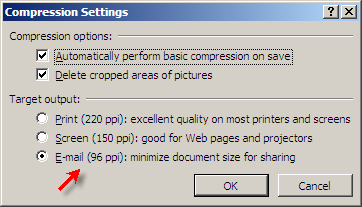
1. Click the Compress Picture button (available in Picture Tools Format ribbon of PowerPoint 2007) and select "Options". Now choose Email (96 ppi) as the target output and click OK. This should change all the pictures used in your Presentation to an optimal size.

Reduce Powerpoint file sizes
(For PowerPoint XP and 2003, the "Compress Picture" setting can be accessed from the Picture Toolbar or by right-clicking any image used in the PPT and selecting "Format Picture". Choose the Web setting.)

The picture compression trick should solve most of your PowerPoint file size woes. If the issue still persists, read the next two tips.

2. Incase you are using any BMP wallpapers or scanned TIFF images in the PowerPoint presentation, convert them to JPG and reinsert.

3. Are there any audio mp3 file or movie clips embedded in the Presentation slides. You may upload them on a website (like Twango) and place a hyperlink in your presentation.

Your PowerPoint Presentation should now be light and more manageable. The other solution is to use Scribd or Slideshare where your friends can even download the original PPT file or watch it online as a Flash object.

The Official Dell Ubuntu Homepage is now live

Dell Ubuntu Homepage
We'll soon have an option to buy Dell desktops and laptops pre-installed with Ubuntu 7.04, one of the most popular Linux distros. This was announced by Mark Shuttleworth, founder of Ubuntu, on Dell's corporate blog.

The Dell-Ubuntu tie-up announcement should generate enough excitement among Linux cheerleaders and even in China where Naked PCs are popular, though for different reasons.

Currently, a Microsoft sponsored tagline that says "Dell recommends Windows Vista™ Business." is pasted on almost every webpage of the Dell.com website.

Not sure if that'll change in near future because Dell is likely to advocate Ubuntu only for consumer PC's and not businesses. You may however be surprised to learn that Dell founder & CEO Michael Dell is an Ubuntu fan himself and his home laptop runs on Ubuntu.

Dell has just launched a placeholder website for Ubuntu at dell.com/ubuntu.

Overall, this development may bring down the prices of Dell machines and help Dell make inroads into the Linux community. For Ubuntu, it's an excellent opportunity to become mainstream.

How Fast Do Search Engines Index Fresh Content

Yesterday was a unique day in the blogosphere. Following the crackdown by Digg staff, the infamous hex key - 09 f9 11 02 9d 74 e3 5b d8 41 56 c5 63 56 88 c0 - was written all over the Internet from blogs to news portals to social websites.

Legal issues apart, this mutiny at Digg gives us a great opportunity to compare the indexing behaviour of search engines and how frequently search bots scroll the web in pursuit of fresh content.

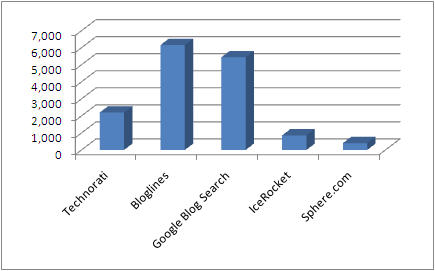
We executed a search for 09 f9 11 02 9d 74 e3 5b d8 41 56 c5 63 56 88 c0 (without quotes) on all major web and blogs search engines and here are the results.

Web Search

Microsoft owned Live search has just 18k pages containing the HD DVD key while Google has indexed over half a million documents containing that number.

Blog Search

In case of Blog Search Engines, Bloglines (owned by Ask.com) found 6160 blogs and RSS feeds that mentioned the HD DVD key while Technorati suggested the number as 2200. Google Blog Search results were ~5.5k.


This stylish and fantastic Bubble Head or egg-head webcam is a concept by Nanjing OIOI Design. The webcam is aimed at youth and students. The Bubble Head web cam has more functionalities than just shooting video as standard web cam. This web cam also incorporate a clock around the lens that shows the time even when the web camera is not in use, and have stubby little flexible arms that can hold a pen or pencil.
The unique and functional bubble egghead web cam is expected to be a next hot “sale item” if the concept makes it to mass production. Below is a photo to show you the several designs of this web cam concept, sure one will be your favorite.

Smoking kills Internet2


Say what you want about net neutrality, at least the Internet hasn't been taken out by a hobo. Unlike the regular Internet we all use everyday, which was originally designed to distribute the AACS hex key withstand a nuclear attack, Internet2 is designed primarily for speed -- up to 9.08Gbps in most recent tests. All that juice comes at the price of redundant network links, though -- which means the whole thing got taken offline last night when a homeless man threw a cigarette onto a mattress under Boston's Longfellow Bridge, starting a blaze that eventually melted the fiber-optic link between Boston and New York. While initial estimates called for a service outage of 1-2 days, quick-thinking techs were able to get service going again in just 4 hours. Good thing, too -- if the panic that sets in around here when our DSL goes out is any indication, with the kind of bandwidth these guys were missing out on, there must've been wailing in the street.

Microsoft employee blogs about switch to Ubuntu


With the release of Ubuntu 7.04 Feisty Fawn, many users might be considering making the switch to Linux. But one particular user who has decided to blog about his switch is worth noting.


He's a Microsoft employee who has decided that he needs to try something new for his own peace of mind. And the new thing he's trying is Ubuntu.


Now, there are a lot of folks out there who will try to make this into something bigger than it is. He's not giving up on Windows or quitting his job at Microsoft. He's installing and learning to use a new operating system. He even posts that he considered switching to Mac OS X but wasn't ready to buy any new hardware.


But the blog is still worth a read if you've recently installed Ubuntu or are considering making the switch. As he documents his progress, you'll find a good set up tips for using Linux from someone who's used to Windows.

Google expands personalization with iGoogle


Google Inc. is stepping up efforts to allow its users to personalize how they search the Web, moving beyond the one-size-fits-all approach to search it already offers.


Officials told reporters at Google's Silicon Valley headquarters on Monday of moves to allow users to share their own writings, photos, lists and other creative efforts, as well as to give consumers personalized views of the Web through use of their geographical location and search history.


The world's top provider of Web search services is bringing together the more idiosyncratic approach to finding information on the Internet under the umbrella term "iGoogle", the new name for its enhanced personalized home page services."We want to personalize the traditional notion of search," Sep Kamvar, lead engineer for the personalization push, told reporters. "I am an eclectic person. But everyone is. We can't go about designing products for the average person."

Launch: Web-based Yahoo! Messenger released


Yahoo!'s answer to web-based Google Talk is now live on the tubes: Yahoo! Messenger for the Web lets you chat, download-free, on the Y! network right inside the web browser.


Let's cut to the chase. Web-based Y! Messenger takes the desktop app experience in the browser to a whole new level with some killer features: "so-and-so is typing" notification while your chat buddy is composing a message (Campfire, you need this), slick tab title scrolling of a new message when Web Messenger is in a background tab, online per-contact message history, a tabbed interface for multiple chats and an animated selection of Y!'s classically fun and expressive emoticons. Also, Y! Messenger plays nice with Windows Live Messenger, too.


It was on Yahoo! Messenger that I fell in love with chatting back in the late 90's, so I'd be lying if I said Messenger for the Web didn't make my heart skip a beat or two tonight. Browser support is impressive, too: you can get your web-based Y! chat on in Firefox, Internet Explorer, Opera AND Safari. My Y!-loyal pal over in IT lockdown is literally throwing a party over this, she hasn't had her favorite instant messenger at the office for so long. Sign in with your Yahoo! account over at http://web.im (nice domain, Yahoo) to give it a spin. Thanks, Ryan!


Yahoo! Messenger for the Web

Thursday, November 02, 2006

Adobe Soundbooth: An Audio Editing Software For Your Mom

Adobe Labs is buzzing with activity this week. Today, the Adobe developers released a new sound editing software called Adobe Soundbooth that's absolutely free and has all the basic ingredients that you need for recording a professional sounding podcast or voiceovers for your Powerpoint presentations or Sceencasts.


If you have worked with other Adobe video/audio apps like Premiere, After Effects or Audition, you will feel very comfortable with the new Soundbooth interface - it has the same gray theme with a panel based layout. [see screenshot]

The USP of Soundbooth is that you can accomplish the three most common audio clean-up tasks with the click of a button - i.e., remove the background noises, rumbling sounds or the clicks & pops. Advanced users may try the Lasso tool to selectively remove audio that matches certain frequencies by making marquee selections around the waveforms.

Also present are the standard audio enhancing features like Fades, Normalize and Trimming. With Adobe Soundbooth, you can extract audio from video clips [like avi, wmv], enhance their sound quality inside Soundbooth and later export them to a variety of audio formats.

Unfortunately, the first public beta version available at the Adobe Labs is buggy and did crash a couple of times on our Windows XP SP2 machine. There's no support for common audio/video formats like MP3, FLV or H.264 though Adobe says that support will be available in the future releases.

Adobe is targeting non-techies and casual users who do not feel comfortable inside sophisticated applications like Cool Edit or Adobe Audion.

Overall, it's will be an interesting application to watch in the coming months when they fix the initial bugs and add support for more codecs. While Audacity is still the audio software of choice for most newbie podcasters, Soundbooth could be a good alternative though the retail version may not be available for free.

Soundbooth Page | Audition Blog | Download Soundbooth

Wait Over! Windows Media Player 11 Is Out of Beta


Microsoft today released the final version of Windows Media Player 11 on their Download center website. Like all other Microsoft products, you are required to validate your personal copy of Windows XP before Microsoft feeds you the secret link to download WMP 11.

Download Windows Media Player 11 [requires validation]

Download Media Player 11 [wmp11-windowsxp-x86-enu.exe, bypass wga check]

The biggest gripe with WMP 11 is that you cannot change the default installation folder plus Microsoft has shown no love for podcasters and podcast feed consumers.

Microsoft Office 2007 & Windows Vista : Product Packaging Screenshots


The new packaging of Office 2007 system and Windows Vista is inside a small, hard, plastic container that's designed to protect the software inside for life-long use. It provides a convenient and attractive place for you to permanently store both discs and documentation.

Google Talk gets Offline Messages


Google Talk now allows you to send offline messages to all your Chat History enabled Gmail buddies.

This was one of the greatest feature which missed out of Google Talk earlier, we used to see error message “ is offline and can’t receive messages right now” when sending message to someone who is not signed in, but not anymore.

Note: Offline Messages won’t work if your recipient hasn’t enabled chat history or if your in “off the record” mode